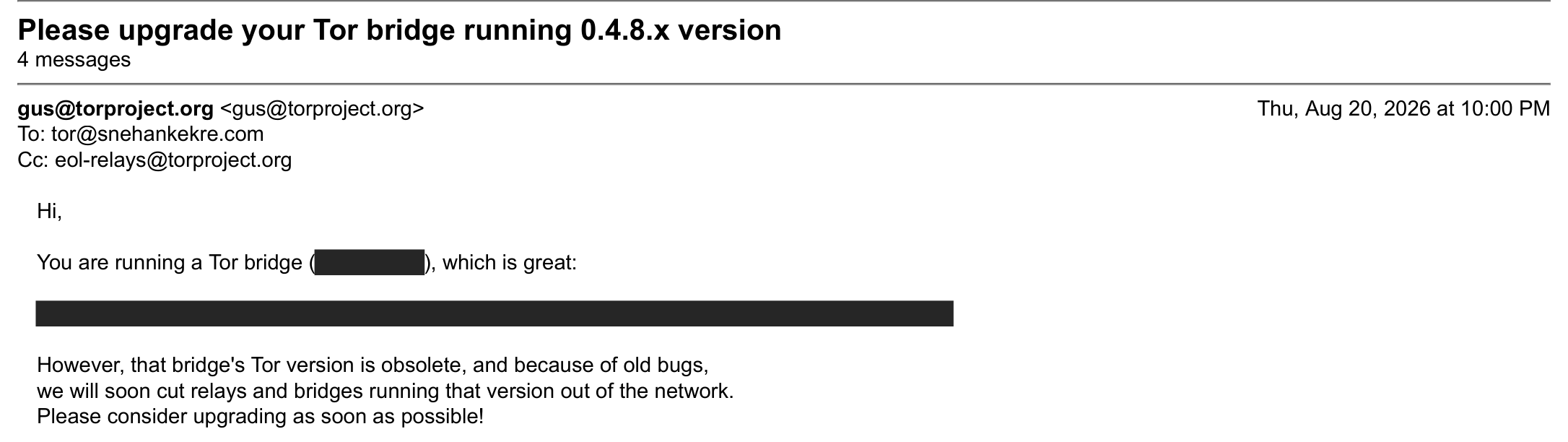
At 10pm on 20 August, Gus from the Tor Project emailed me saying my Tor bridge was running a version of Tor that was “obsolete, and because of old bugs, we will soon cut relays and bridges running that version out of the network.”
The bridge ran on a VPS I had set up years earlier and then stopped looking at. It was still on Debian 10 (buster). According to the apt logs, the last time I upgraded anything on it was 3 November 2024, when tor went from 0.4.8.12 to 0.4.8.13. Before that I had kept up reasonably well. The dpkg logs show eight Tor upgrades between January 2022 and November 2024 all run by hand. Then I stopped for 21 months.
The bridge kept working the whole time. Tor’s heartbeat line from the morning of 20 August, a few hours before the email:
Heartbeat: Tor's uptime is 42 days 0:00 hours, with 371 circuits open.
I've sent 848.35 GB and received 866.59 GB.
I stopped because logging in had turned into a chore that gave me anxiety because I no longer remembered how to do it. SSH on that box accepts keys that live on a YubiKey. I had two YubiKeys and two key files, and I could not have told you which went with which. Whenever I thought about the server, I thought about that first and did something else.
I replied to Gus that night and said I would try to get back into the box the next day. This post is what I did on 21 August, reconstructed from the fish history on my Mac, bash history on the server, the apt and dpkg logs, the systemd journal, and my browser history.
Getting back in
My fish history from that morning:
10:42:16  ssh -i <user>@<vps> -p <port>
10:44:31  ssh -i ~/.ssh/id_ecdsa_sk.pub <user>@<vps> -p <port>
10:46:00  code /Users/snehan/.ssh/known_hosts
10:46:24  code /Users/snehan/.ssh/known_hosts.old
10:47:14  mv /Users/snehan/.ssh/known_hosts /Users/snehan/.ssh/known_hosts.new
10:47:27  mv /Users/snehan/.ssh/known_hosts.old /Users/snehan/.ssh/known_hosts
10:47:37  ssh -i ~/.ssh/id_ecdsa_sk_neo.pub <user>@<vps> -p <port>
The first attempt passes -i with no file, so ssh read the username as the identity file. The second points -i at a public key. Then I swapped my known_hosts for an older copy and back again.
My browser history from that day shows where else I looked. I searched my Gmail for “ovh” and “gpg”, opened a Google Drive folder called keys, opened the VPS’s dashboard in the OVH control panel, and read OVH’s getting started guide for its VPSes. To work out which physical token was which, I used Yubico’s guide to identifying a YubiKey and downloaded Yubico Authenticator, which shows a token’s model and firmware version.
How a YubiKey SSH key works
The keys are ecdsa-sk keys, the type OpenSSH 8.2 added for FIDO hardware tokens. You create one with ssh-keygen -t ecdsa-sk while the token is plugged in. The token generates the key pair internally and never exports the private key. What lands in ~/.ssh/id_ecdsa_sk is a key handle that only that token can use, optionally encrypted with a passphrase. A login needs the file, the passphrase if there is one, the matching token plugged in, and a physical touch on the hardware token. In ssh -v output it looks like this:
debug1: Server accepts key: /Users/snehan/.ssh/id_ecdsa_sk ECDSA-SK SHA256:... authenticator
Enter passphrase for key '/Users/snehan/.ssh/id_ecdsa_sk':
Confirm user presence for key ECDSA-SK SHA256:...
debug1: sk_probe: 1 device(s) detected
debug1: sk_try: fido_dev_get_assert: FIDO_ERR_SUCCESS
User presence confirmed
Authenticated to <vps> ([<vps>]:<port>) using "publickey".
Both of my keys are ECDSA because one of the tokens is a YubiKey NEO. The NEO predates FIDO2 and speaks only U2F, which signs with ECDSA on the P-256 curve. The newer ed25519-sk type needs a FIDO2 token that supports Ed25519, which the YubiKey 5 does from firmware 5.2.3 on and the NEO does not. OpenSSH’s ssh-keygen manual lists both types. I made both keys ecdsa-sk so they would behave the same way.
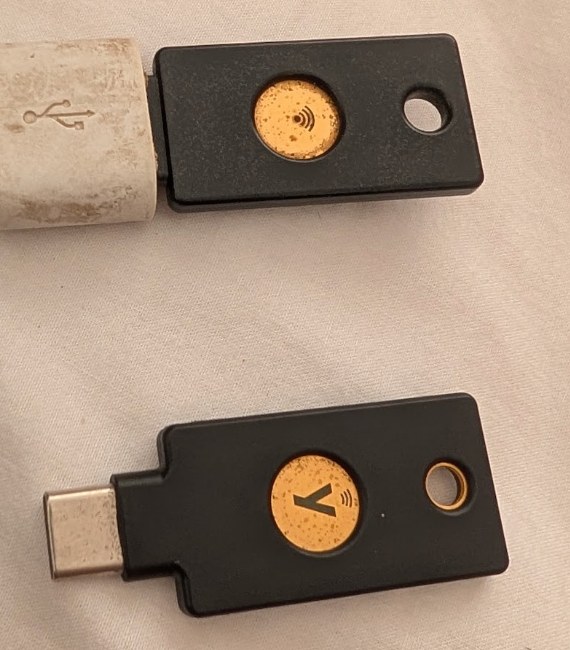
When I created the two key files, I named them the wrong way round. The file called id_ecdsa_sk_neo belonged to the YubiKey 5, and id_ecdsa_sk belonged to the NEO. Plugging in one token and pointing ssh at the other token’s file gets you a server that accepts the public key and a token that cannot sign for it.
Locking myself out with fail2ban
The server’s journal fills in what my shell history leaves out. At 10:55 it logged two failed password attempts for my user from my home IP. Password authentication was still enabled as a fallback. Since I had typed the wrong password fail2ban banned my home IP. I recall setting up fail2ban years ago to block repeated password attempts because the VPS was on a non-default port and I didn’t want to see the log spammed with failed attempts.
At 10:56, from my VPN, the journal shows an accepted login with an ECDSA-SK key. That was the NEO. The rest of the day went through the VPN until I unbanned myself from inside that session:
sudo fail2ban-client status sshd
sudo fail2ban-client set sshd unbanip <home ip>
Later that day I added the YubiKey 5’s public key to authorized_keys, so either token can log in now. Then I renamed the files on my Mac so each name matches its token. The first attempt at the rename went wrong because I renamed the private key but not its .pub. So I did it again through a temporary name:
cd ~/.ssh/
mv id_ecdsa_sk id_ecdsa_sk_temp
mv id_ecdsa_sk.pub id_ecdsa_sk_temp.pub
mv id_ecdsa_sk_neo id_ecdsa_sk
mv id_ecdsa_sk_neo.pub id_ecdsa_sk.pub
mv id_ecdsa_sk_temp id_ecdsa_sk_neo
mv id_ecdsa_sk_temp.pub id_ecdsa_sk_neo.pub
ssh-keygen -lf ~/.ssh/id_ecdsa_sk.pub prints a key’s fingerprint, and sshd logs the fingerprint of every key it accepts. I confirmed which file the server had let in by matching the two.
What was on the box
Before changing anything, this is what apt was pulling from:
- Debian’s repositories in
/etc/apt/sources.listall sayingbuster. - The Tor Project’s repository, which is where
torcame from. The installed version string was0.4.8.13-2~d10.buster+1, and~d10.bustermarks a Tor Project build for Debian 10. - Docker’s repository, in
/etc/apt/sources.list.d/docker.list.
The machine had 4 GB of RAM, fail2ban 0.10.2, openssh-server 8.4p1 from buster-backports, and Linux 4.19.
Upgrading from Debian 10 to 13 in under an hour
Debian supports upgrading one release at a time, so 10 to 13 is three upgrades: buster to bullseye, bullseye to bookworm, and bookworm to trixie. The Debian wiki has the procedure, and this r/linuxquestions thread asks the same question I had, about getting from 10 to 12. I ran the same loop three times without breaking anything. My shell history shows what I ran in this order:
sudo nano /etc/apt/sources.list          # change the release codename
sudo sed -i 's/bullseye/bookworm/g' /etc/apt/sources.list.d/docker.list
sudo apt update
sudo apt upgrade --without-new-pkgs -y
sudo apt full-upgrade -y
sudo reboot
upgrade --without-new-pkgs upgrades whatever it can without installing or removing packages. full-upgrade then does the rest, including removals and the new kernel. Splitting it this way gets the package manager itself and the core libraries onto the new release before apt has to solve the hard dependency changes. The reboot at the end of each hop means the next hop starts on that release’s kernel, with every service running against its libraries.
The apt history log timestamps each hop:
| Hop | apt started | booted into | at |
|---|---|---|---|
| 10 → 11 (bullseye) | 11:28 | Linux 5.10.262 | 11:47 |
| 11 → 12 (bookworm) | 11:52 | Linux 6.1.180 | 12:01 |
| 12 → 13 (trixie) | 12:14 | Linux 6.12.101 | 12:23 |
That’s 55 minutes from the first apt upgrade to a Debian 13 boot, which is not bad imo after almost two years of putting it off.
Here are the versions of the packages I care about as dpkg recorded them at each stop:
| Package | Debian 10 | 11 | 12 | 13 |
|---|---|---|---|---|
tor | 0.4.8.13 | 0.4.8.13 | 0.4.9.11 | 0.4.9.11 |
openssh-server | 8.4p1 (backport) | 8.4p1 | 9.2p1 | 10.0p1 |
fail2ban | 0.10.2 | 0.11.2 | 1.0.2 | 1.1.0 |
| kernel | 4.19 | 5.10 | 6.1 | 6.12 |
I tried not touching the ssh and kernel configs in fear of breaking the only way in.
What went wrong during the upgrade
A 404 on every repository
The first time I rewrote sources.list for bullseye, apt update returned 404 for every Debian repository:
Err:6 http://deb.debian.org bullseye Release
  404  Not Found [IP: 2a04:4e42:20::644 80]
E: The repository 'http://deb.debian.org bullseye Release' does not have a Release file.
I had written
deb http://deb.debian.org bullseye main contrib non-freeand left out the /debian/ path, so apt was asking for http://deb.debian.org/dists/bullseye/Release, which doesn’t exist. The line needs to be
deb http://deb.debian.org/debian/ bullseye main contrib non-freeThe security repository is at a different host and path again
http://security.debian.org/debian-security bullseye-securityWith the paths fixed, one 404 remained for bullseye-backports. Backports for bullseye have been moved off the main mirrors to archive.debian.org. I didn’t need them for the upgrade, so I commented those two lines out and carried on.
Third-party repositories do not follow along
Changing sources.list only changes Debian’s repositories. Anything in /etc/apt/sources.list.d/ keeps pointing at the old release until you change it too. I remembered Docker and ran a sed on docker.list at each hop. I didn’t touch the Tor Project’s list, which kept saying buster through all three hops. That turned out fine, for a reason I explain in the Tor section below. But that was just luck.
Configuration file prompts
dpkg stops when a package ships a new version of a configuration file that you have changed locally. The upgrade stopped four times.
On the first hop it asked about /etc/cloud/cloud.cfg. I pressed D to see the diff, then Y to take the package maintainer’s version. Thankfully the term log recorded both keystrokes:
*** cloud.cfg (Y/I/N/O/D/Z) [default=N] ? D
*** cloud.cfg (Y/I/N/O/D/Z) [default=N] ? Y
On the last hop it asked about /etc/ssh/ssh_config and /etc/pam.d/sshd. I kept mine (N) for both, because anything touching SSH on a machine I can only reach over SSH gets the conservative answer.
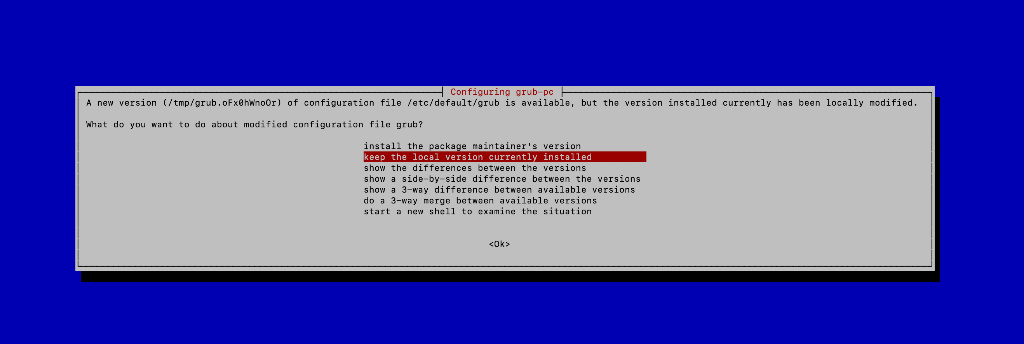
The last hop also stopped on /etc/default/grub, in a full-screen dialog from ucf rather than dpkg’s plain prompt, with “keep the local version currently installed” highlighted. I kept it. VPS images usually put their own kernel command line in that file, for example to send the console to a serial port the provider’s panel can read, and I didn’t want to find out whether this one would boot without it lol.
cloud-init owns sources.list
The top of /etc/apt/sources.list on this VPS says:
## Note, this file is written by cloud-init on first boot of an instance
## modifications made here will not survive a re-bundle.
cloud-init writes that file on an instance’s first boot. It doesn’t rewrite it on every boot, and the file still says trixie after the three upgrade reboots and every automatic reboot since. If the provider ever re-provisions the instance, I’ll need to add apt_preserve_sources_list: true to /etc/cloud/cloud.cfg or move my sources into sources.list.d.
How I kept the box reachable
The risk in upgrading a remote machine is losing the only way in. Agains’t my better judgment, I didn’t take a snapshot in the OVH panel before starting, so if the box had stopped booting there was nothing to roll back to. Three things kept that from happening.
First, I upgraded one release at a time and rebooted in between. That meant if something went wrong, I would’ve been left on a consistent release instead of a half-upgraded mess.
Second, sshd came back on every restart. dpkg restarts sshd whenever it upgrades openssh-server, and the journal shows it listening again each time on the same non-default port, which meant my sshd_config had survived:
Aug 20 23:35:19 sshd[668]: Received signal 15; terminating.
Aug 20 23:35:19 sshd[23404]: Server listening on 0.0.0.0 port <port>.
Aug 20 23:35:19 sshd[23404]: Server listening on :: port <port>.
(The server’s clock runs 12 hours behind mine, so 23:35 there was 11:35 here.) The journal has five more restarts like that during the upgrade in addition to the three reboots. I stayed logged in during each full-upgrade and only reconnected after a reboot: the journal shows new logins at 11:48, 12:10 and 12:33, each a minute or two after the machine came back.
Third, Tor came back on its own after every reboot. Each boot shows Bootstrapped 100% about 30 seconds after the kernel starts, followed by the reachability self-test:
Aug 21 00:23:39 Tor[1041]: Bootstrapped 100% (done): DoneNote: Not making a snapshot was plain stupid. I was lucky that the box stayed reachable. If it hadn’t, I would have had to rebuild it from scratch, which would have taken hours and meant losing the bridge’s identity on the Tor network. Don’t do what I did. Please take a snapshot before you upgrade a remote machine.
Tor upgraded itself partway through
I expected to deal with Tor after the OS was done. It moved during the bookworm hop. At 11:58, in the middle of full-upgrade, dpkg logged:
upgrade tor:amd64 0.4.8.13-2~d10.buster+1 0.4.9.11-0+deb12u1My sources for the Tor Project’s repository still said buster, so apt had nothing newer from there. Debian bookworm’s tor package was 0.4.9.11, which sorts higher than 0.4.8.13, so apt took Debian’s. This is why leaving the Tor list alone didn’t hurt me. If Debian’s package had been older than the Tor Project’s buster build, the bridge would have stayed on 0.4.8.13 through all three hops.
At 13:12 I wrote back to Gus that the bridge was on 0.4.9.11.
I still wanted Tor from the Tor Project’s repository, because that is where new releases land first. I followed their installation guide, re-fetched their signing key, and replaced the old .list file with a deb822-format /etc/apt/sources.list.d/tor.sources:
wget -qO- https://deb.torproject.org/torproject.org/A3C4F0F979CAA22CDBA8F512EE8CBC9E886DDD89.asc \
  | gpg --dearmor | sudo tee /usr/share/keyrings/deb.torproject.org-keyring.gpg >/dev/null
Types: deb deb-src
URIs: https://deb.torproject.org/torproject.org/
Suites: trixie
Components: main
Signed-By: /usr/share/keyrings/deb.torproject.org-keyring.gpg
Types: deb deb-src
URIs: https://deb.torproject.org/torproject.org/
Suites: tor-experimental-trixie
Components: main
Signed-By: /usr/share/keyrings/deb.torproject.org-keyring.gpgThe second stanza is Tor Project’s experimental suite which I enabled on purpose. apt installs the highest version available across both suites, so whenever a Tor alpha or release candidate is published there, the bridge gets it.
At 13:29 tor moved to 0.4.9.11-1~d13.trixie+1: the same Tor release now built by the Tor Project for trixie.
nyx, the terminal monitor for Tor which I sometimes look at to see how much bandwidth the bridge has used, survived the upgrade with one new complaint:
/usr/lib/python3/dist-packages/nyx/curses.py:118: SyntaxWarning: invalid escape sequence '\['
  ANSI_RE = re.compile('\x1B\[([0-9;]+)m')
Trixie ships Python 3.13, and since Python 3.12 an unrecognised backslash escape in a normal string literal is a SyntaxWarning instead of a silent DeprecationWarning. The regex still works. nyx also warns when it runs as root, which I had been doing with sudo nyx for years (yikes!). Adding my user to the debian-tor group lets it now read Tor’s control port without sudo:
sudo usermod -aG debian-tor <user>The torrc afternoon
With the bridge upgraded, I spent the afternoon on its configuration. My browser history from that stretch is a list of torrc option names typed into a search box. Two of the changes were worth making and one was not.
An IPv6 ORPort that was already there
I added an explicit IPv6 ORPort:
ORPort <orport>
ORPort [<ipv6 address>]:<orport>
I have since read the journal from earlier that day, and Tor had been listening on IPv6 all along. A bare ORPort <orport> binds both 0.0.0.0 and [::], and the self-test before my change says:
Self-testing indicates your ORPort [<ipv6 address>]:<orport> is reachable from the outside. Excellent. Publishing server descriptor.Since my change, every start logs a warning that the second line overrides the first for IPv6, and the IPv6 listener is bound to one address instead of [::]:
[warn] Configuration port ORPort <orport> superseded by ORPort [<ipv6 address>]:<orport>Pinning the address is harmless, but it did not give the bridge anything it lacked. The heartbeat from before the upgrade puts IPv6 in proportion anyway: 58,002 inbound connections on IPv4 and 13 on IPv6 over 41 days.
A 19-minute outage from a bandwidth limit
I set a bandwidth rate and burst so the bridge would stay inside what the VPS plan allows. The Tor support pages on bandwidth limits and bandwidth shaping cover the options, and OVH’s VPS FAQ covers what the plan includes. At 17:04, restarting Tor failed:
[warn] Failed to parse/validate config: RelayBandwidthBurst must be at least equal to RelayBandwidthRate.
[err] Reading config failed--see warnings above.
tor@default.service: Failed with result 'exit-code'.
tor@default.service: Start request repeated too quickly.
I had set the burst lower than the rate. systemd retried five times in just over a second and gave up, and the bridge stayed down until I fixed the file and Tor bootstrapped again at 17:23. The working pair:
RelayBandwidthRate 31 MBytes
RelayBandwidthBurst 31 MBytes
Tor can check a config without starting, and running it before each restart would have caught this in a second without taking the bridge down:
sudo -u debian-tor tor --verify-config -f /etc/tor/torrcMaxMemInQueues
Tor logs the memory cap it picks for queued cells at startup:
Based on detected system memory, MaxMemInQueues is set to 2878 MB. You can override this by setting MaxMemInQueues by hand.I set it by hand to MaxMemInQueues 3072 MB. nyx showed Tor using 624 MB, about 16% of RAM, so neither number is close to mattering yet.
I also read about WebTunnel, a newer pluggable transport that makes bridge traffic look like ordinary HTTPS to a web server, along with this guide to running obfs4 and WebTunnel bridges. The bridge still runs obfs4 only. I might add WebTunnel later.
Enabling automatic updates so this does not happen again
The box fell 21 months behind because every upgrade depended on me logging in. unattended-upgrades takes me out of that loop. The Tor Project has a page for relay operators that covers the setup:
sudo apt-get install unattended-upgrades apt-listchanges/etc/apt/apt.conf.d/20auto-upgrades turns it on. It refreshes package lists and runs an upgrade once a day:
APT::Periodic::Update-Package-Lists "1";
APT::Periodic::AutocleanInterval "5";
APT::Periodic::Unattended-Upgrade "1";
APT::Periodic::Verbose "1";
By default, it only installs from Debian’s origins. In /etc/apt/apt.conf.d/50unattended-upgrades I added the Tor Project’s repository and turned on automatic reboots:
Unattended-Upgrade::Origins-Pattern {
    "origin=Debian,codename=${distro_codename},label=Debian-Security";
    "origin=TorProject";
};
Unattended-Upgrade::Automatic-Reboot "true";
apt merges repeated list blocks instead of replacing them, so this adds to the default origins. Every run logs the merged list, which is how I checked:
INFO Allowed origins are: origin=Debian,codename=trixie,label=Debian,
  origin=Debian,codename=trixie,label=Debian-Security, ...,
  origin=TorProject
Both the stable and the experimental suite publish Origin: TorProject in their Release files, so origin=TorProject matches both, and experimental builds arrive unattended too.
Before trusting it I ran sudo unattended-upgrade --debug --dry-run, installed powermgmt-base, and ran the dry run again.
Without Automatic-Reboot a kernel update is installed and then sits on disk until someone reboots, which on this box would have meant me. With no Automatic-Reboot-Time set, it reboots as soon as a run that needs one finishes. For a bridge that means users lose their connections for about a minute, which Tor clients handle by reconnecting.
It has been five weeks, and the logs show it doing its job. On 27 August it installed kernel 6.12.105:
2026-08-27 06:35:03 install linux-image-6.12.105+deb13-cloud-amd64:amd64 <none> 6.12.105-1
Aug 27 06:35:16 systemd-logind[939]: The system will reboot now!
Aug 27 06:35:58 kernel: Linux version 6.12.105+deb13-cloud-amd64 ...
That’s 42 seconds from the reboot to the new kernel. On 31 August it did the same for 6.12.107 and logged Found /var/run/reboot-required, rebooting. 6.12.107 is the kernel my login banner shows today. Tor has moved twice since I stopped touching it:
2026-09-10 06:20:09 upgrade tor:amd64 0.4.9.11-1~d13.trixie+1 0.4.9.12-1~d13.trixie+1
2026-09-25 06:51:05 upgrade tor:amd64 0.4.9.12-1~d13.trixie+1 0.4.9.13-1~d13.trixie+1
Neither of those involved me, a YubiKey, or remembering which key file is which.
What changed in the SSH handshake
A side-effect I didn’t plan for is that the SSH connection to the server now uses a post-quantum key exchange.
An SSH connection does two separate cryptographic jobs. The key exchange agrees on the session keys that encrypt everything after it. Authentication proves who you are and, with my setup, that is the YubiKey signing a challenge. The two face different quantum threats. Someone can record encrypted traffic today and decrypt it once a large enough quantum computer exists (see BULLRUN), so a key exchange has to hold up for as long as the traffic needs to stay secret. A signature only has to hold at the moment you log in. Forging my YubiKey’s signature in ten years doesn’t let anyone into a session from today. That’s why why OpenSSH moved the key exchange first. Their post-quantum page explains the reasoning.
The OpenSSH versions involved:
| OpenSSH | default key exchange | |
|---|---|---|
| server before (buster-backports) | 8.4p1 | curve25519-sha256 |
| server after (trixie) | 10.0p1 | mlkem768x25519-sha256 |
| my Mac, Homebrew | 10.3p1 | mlkem768x25519-sha256 |
my Mac, /usr/bin/ssh | 9.9p2 | sntrup761x25519-sha512 (upstream 9.9) |
OpenSSH added its first hybrid post-quantum exchange, sntrup761x25519-sha512, in 8.5 and made it the default in 9.0. 8.4, the version on the server before the upgrade, predates both, so every session to it used plain curve25519-sha256. OpenSSH 9.9 added mlkem768x25519-sha256, which pairs ML-KEM, the lattice-based key encapsulation NIST standardised as FIPS 203, with X25519, and 10.0 made it the default. The hybrid means an attacker has to break both halves. OpenSSH 10.1 and later also print a warning when a connection falls back to a key exchange that is not post-quantum, which is what this r/hetzner thread is about.
At 12:57 I checked which ssh my shell was running. It was Homebrew’s, which I had installed in May, rather than the one macOS ships. Its ssh -Q kex lists every key exchange it supports, and the last three are the post-quantum hybrids:
...
sntrup761x25519-sha512
sntrup761x25519-sha512@openssh.com
mlkem768x25519-sha256
ssh -v shows what a connection negotiated:
debug1: Remote protocol version 2.0, remote software version OpenSSH_10.0p2 Debian-7+deb13u4
debug1: kex: algorithm: mlkem768x25519-sha256
debug1: kex: host key algorithm: ssh-ed25519
The same output shows the other half which is that the server’s host key is ssh-ed25519, and my login signature is ECDSA-SK, both classical. OpenSSH has no post-quantum signature key type yet, and the FIDO standards the YubiKeys implement don’t define one, so there is nothing to switch the tokens to. The NEO is stuck on P-256 regardless.
What I would tell myself 21 months ago
- The upgrade was never the hard part. Three Debian releases took 55 minutes. Getting back into the machine took the morning, and dreading it took 21 months.
- Write down how to log in. Which key file goes with which token, the port, the user. I keep a note like that for everything else and never made one for this.
- Label hardware keys by fingerprint.
ssh-keygen -lfon the.pubfile and theAccepted publickeyline in the server’s auth log settle the question of which key is which in a few seconds. - The journal is a better record than shell history. Bash history has no timestamps by default. The journal has every login, every sshd restart, every Tor start, and the exact error when something failed.
- Upgrade third-party repositories with the OS, or know what happens if you don’t. My Tor list stayed on buster and I was saved by Debian shipping a newer Tor.
- Take a snapshot first. I got away without one, and it costs a few clicks in the provider’s panel.
- Read the diff before answering a config file prompt, and keep your own version of anything that could lock you out.
- Run
tor --verify-configbefore restarting Tor. - Automatic updates without automatic reboots leave kernels installed and never running. Turn both on.
I sent Gus one more email that evening to thank him. His email is what finally got me to log in.
